Configuration
Open DSH settings. Work through the three layers in order.
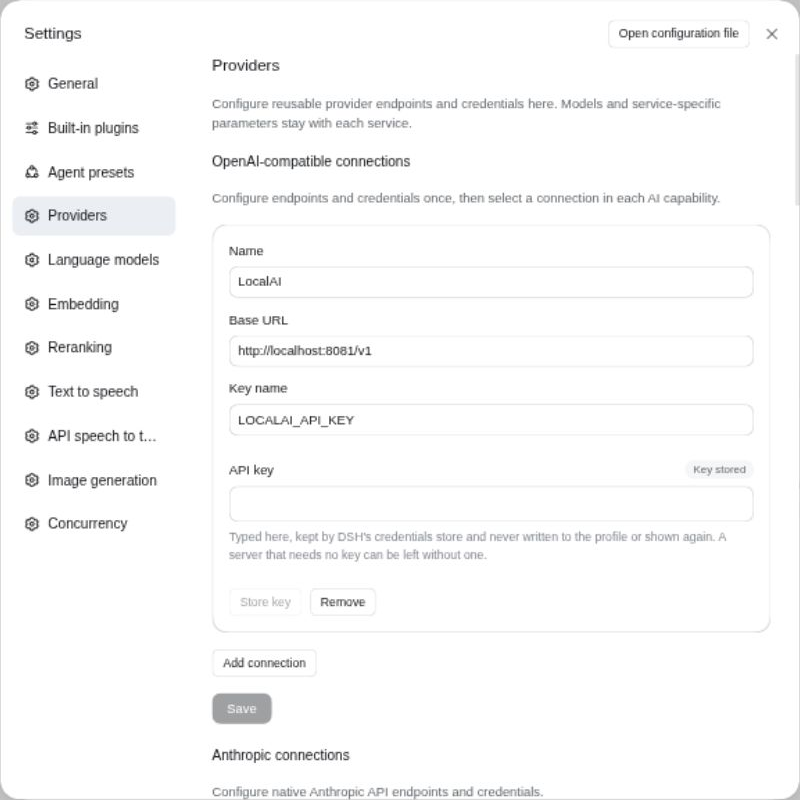
1. Create reusable connections
Open Providers. This single page contains the connection editors contributed by every installed provider plugin; vendors do not add separate settings-sidebar entries.
A connection contains a stable ID, display name, base URL, and a reference to a credential stored by DSH. The secret is handled by DSH's credential service. The plugin configuration stores only the reference and never returns the secret to the browser. Leave the credential reference empty for a server that does not require authentication. On DSH 0.2.1 a key stored in DSH's credential store takes precedence over an exported variable with the same name, and a key can be stored while the variable is exported; on DSH 0.2.0 the exported variable wins and blocks storing a key.
Connections are reusable across capabilities. For example, one LocalAI connection can serve embeddings, speech, images, and language models.
2. Configure vendor capabilities
Open the relevant service page, such as Language models, Embedding, Text-to-speech, or Decisions. Select a provider and connection, then configure its model and service-specific options. OpenAI-compatible defaults are provided, but compatible servers often use different model and voice names.
Removing a connection does not delete the referenced credential. This prevents one plugin from deleting a secret that another configuration may still use.
3. Select active services
Choose one registered provider for each capability:
- embedding;
- reranking;
- text-to-speech;
- API speech-to-text;
- image generation;
- decisions.
Selections take effect without a profile restart. Selecting Disabled removes that capability service from the context. Language models are configured differently: every configured route remains available to DSH at the same time.
Built-in speech-to-text
DSH may provide its own speechToText registry. Keep that registry enabled if you want to use DSH Voice Input: this plugin contributes the selected API transcription provider to it. In DSH's speech-to-text settings, choose that API-backed provider instead of the built-in SenseVoice provider. Do not leave SenseVoice selected when you intend recordings to use the configured API.
The provider-neutral file-transcription service remains available directly as apiSpeechToText; live API transcription is exposed separately as streamingSpeechToText when supported.
Naming and change management
Connection IDs and language-model route IDs are persistent references, not presentation labels. Choose short stable IDs and change the display name when wording needs to improve. Renaming an ID can break capability selections or chat model references that still use the old value.
Configuration fields that describe a connection or model are validated at the settings boundary. Keep provider-specific identifiers exactly as the upstream service publishes them; this project does not translate a friendly model or voice name into an undocumented vendor ID.
Test one capability at a time
Start with one connection and one capability that the endpoint implements. Confirm that path before enabling more services. An OpenAI-compatible base URL may support chat but omit speech or images, and a LocalAI deployment exposes only the backends it has loaded.
When a test fails, use the normalized error code to separate configuration from availability: not-configured points to selection or load state; rejected usually points to credentials, quota, policy, or identifiers; unavailable points to reachability, timeout, or provider health. See Troubleshooting for the complete table.
Concurrency defaults
Leave calls ungated until there is a real shared limit, or add a rule matching the constrained provider, route, or capability. Use background priority for indexing and maintenance, and reserve capacity only when those jobs could delay interactive work. The status view shows which rule is holding or queuing calls.