DashScope
@dsh-ai-providers/dashscope is the native Alibaba Cloud DashScope (Model Studio, the home of the Qwen models) provider maintained by Firefox2100 as part of this project. It speaks DashScope's own API rather than its OpenAI-compatible layer, because the native API carries more controls, and covers language models, embeddings, reranking, speech synthesis, speech recognition, and image generation. It is not an official DSH or Alibaba Cloud package.
Supported capabilities
| Capability | Native endpoint |
|---|---|
| Language models | POST /services/aigc/text-generation/generation, or .../multimodal-generation/generation for models that read images (server-sent events) |
| Model discovery | GET /models?capabilities=TG |
| Embeddings | POST /services/embeddings/text-embedding/text-embedding |
| Reranking | POST /services/rerank/text-rerank/text-rerank |
| Speech synthesis | Qwen-TTS: POST /services/aigc/multimodal-generation/generation; CosyVoice: WebSocket /api-ws/v1/inference |
| Speech recognition | POST /services/aigc/multimodal-generation/generation (Qwen-ASR) |
| Image generation | POST /services/aigc/multimodal-generation/generation (Qwen-Image, Wan 2.6) |
Left out: live (streaming) speech recognition, whose WebSocket protocol could not be confirmed from the documentation; image and video models that only run as asynchronous tasks; sparse embeddings; and images and video as embedding inputs or rerank documents, because the shared contracts carry dense vectors and text only.
Configure a connection
Open Settings > Providers > DashScope connections. The default connection is:
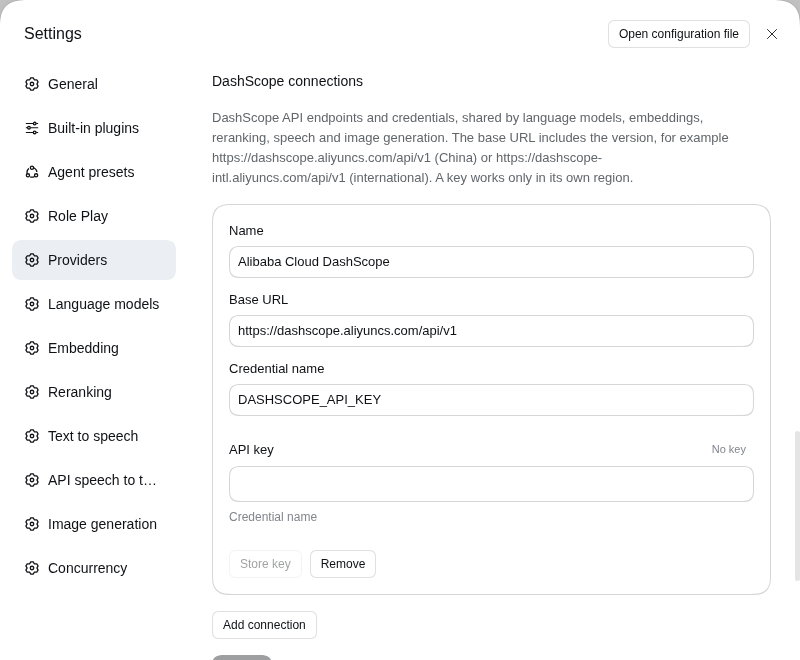
| Setting | Default |
|---|---|
| Base URL | https://dashscope.aliyuncs.com/api/v1 |
| Credential reference | DASHSCOPE_API_KEY |
| Stream silence limit | 5 minutes |
| Embedding and rerank timeout | 1 minute |
The base URL includes the version. The key is stored through DSH's credential service, never in the profile, and sent as Authorization: Bearer. Keys belong to a region, so use a connection with the matching base URL, such as https://dashscope-intl.aliyuncs.com/api/v1 for the international service. Add one connection per region or workspace if you use several.
Language models
Create a route, select a connection, and add model names such as qwen-plus. List models on the account pages through GET /models and adds each text-generation model with the context window and output limit DashScope reports, marking those that accept images.
A model marked as reading images (vision) is sent to the multimodal endpoint, where content is a list of parts; other models use the text endpoint. The provider supports system prompts, text and image content (images as data URLs), tool declarations and results, streamed text, thinking, and tool calls, and token usage with cache reads and reasoning tokens. Tool choice is passed on: auto, none, required, or a named tool.
Every control lives in the request's parameters object. Sampling uses the common fields plus DashScope's own in the same object. Absent means the server's default.
| Field | Request parameter | Notes |
|---|---|---|
temperature, topP, topK, seed | temperature, top_p, top_k, seed | |
repetitionPenalty, presencePenalty | same names | |
maxTokens, stop | max_tokens, stop | |
minP, frequencyPenalty | none | DashScope has no such control; ignored |
toolChoice | tool_choice | A named tool becomes { "type": "function", ... } |
enableThinking, thinkingBudget | enable_thinking, thinking_budget | Hybrid models switch thinking per request; thinking-only models always think |
reasoningEffort | reasoning_effort | low, medium, high, max or xhigh, for models that take levels |
preserveThinking | preserve_thinking | Send earlier reasoning back to the model |
enableSearch, searchOptions | enable_search, search_options | Web search; the options object is passed as written |
enableCodeInterpreter | enable_code_interpreter | |
parallelToolCalls, toolStream | parallel_tool_calls, tool_stream | |
responseFormat | response_format | For example { "type": "json_object" } |
vlHighResolutionImages, minPixels, maxPixels, totalPixels | vl_high_resolution_images, min_pixels, max_pixels, total_pixels | Vision models |
body | inside parameters | Anything else the API accepts, such as logprobs or n, which are not read back |
Streaming is always incremental, in message format, and cannot be turned off. Reasoning levels are parameter fragments, for example { "enable_thinking": true, "thinking_budget": 4000 }, and win over the typed fields. Special-purpose parameters such as translation_options go in body; headers such as X-DashScope-DataInspection go in the route's headers.
Embeddings and reranking
Select DashScope in the Embedding or Reranking tab. Embeddings default to text-embedding-v4 in batches of 10, which most models accept (qwen3.7 takes 20, so raise the batch size for it). The consumer's query or document choice is sent as text_type. Only dense vectors are requested. Vector dimensions must be a size the model offers, such as 64 to 2048 for text-embedding-v4; instruct describes the task to models that read one. Reranking defaults to qwen3-rerank and accepts an instruct that tells it what a good match is; its scores arrive between 0 and 1 and any other value is treated as a malformed answer. Documents are text.
The multimodal embedding models (qwen3-vl-embedding, tongyi-embedding-vision-*) are served by a different endpoint. Choose Multimodal embedding as the embedding API to use them: every text is sent as a { "text": ... } content and embedded on its own, in the same vector space as that model's images. Images and video cannot be passed through the shared embedding interface. qwen3-vl-rerank runs on the same rerank endpoint, so it works as the rerank model for text documents.
Per-call request options: embeddings take dimensions (chosen before a session's first request) and instruct; reranking takes instruct. A rerank request always sends return_documents: false, and fps, which only applies to video documents, is not exposed.
Speech synthesis
Select DashScope in the Text to speech tab. The model name chooses the protocol. A qwen…-tts… model (default qwen3-tts-flash, voice Cherry) is asked over HTTP and answers with the address of a WAV file, which is fetched without the API key and streamed on; text is limited to 600 characters, and languageType (default Auto) names the language. A cosyvoice… model (for example cosyvoice-v3-flash, voice longanyang) runs a task over a WebSocket derived from the base URL (…/api/v1 becomes …/api-ws/v1/inference) and streams audio frames as they are made, in mp3, wav, pcm or opus.
Per-call request options: voice, languageType (Qwen-TTS), and for CosyVoice format, sampleRate, volume, rate, pitch, enableSsml and instruction. A task that fails before it starts, such as a refused key, is an error of the call; one that fails during streaming errors the audio stream. The provider does not list voices, so enter a voice id by hand.
Speech recognition
Select DashScope in the API speech to text tab. A finished recording is sent to qwen3-asr-flash as a data URL, with asr_options carrying the language (left out for automatic detection) and enable_itn. The model takes recordings of up to 5 minutes and 10 MB. The transcript is read from the answer wherever DashScope puts it. Live transcription is not offered.
Image generation
Select DashScope in the Image generation tab. The default model is qwen-image-2.0-pro. The prompt, with any reference images before it as data URLs, is one user message; with references the model edits (up to three) instead of drawing. Image addresses expire after 24 hours, so they are downloaded and returned as image data. Per-call request options: size (width*height), negativePrompt, promptExtend, watermark and seed; the number of images is the call's count (1 to 6 for Qwen-Image). The synchronous endpoint serves Qwen-Image and Wan 2.6; models that only run as asynchronous tasks are not served.
Errors and cancellation
HTTP and stream failures are mapped to DSH language-model failure classes using the status and DashScope's own error code: InvalidApiKey to authentication, Throttling to rate limiting, an exhausted allocation (Throttling.AllocationQuota) or Arrearage to quota, an input that is too long to context overflow, content moderation (DataInspectionFailed) and other bad requests to invalid request, and server failures, timeout, and cancellation. An error event inside a stream that already answered 200 is raised the same way. The request id is kept with the error.