Interface packs
An interface pack changes how a story looks and adds small pieces of interface of its own: a status strip, buttons, an opening card, a backdrop, a tab with a map or a notebook. A world can carry packs, or you can keep your own and use them in any story.
A pack is a folder of plain files: a manifest, an optional stylesheet, and HTML pages with a little JavaScript. There is nothing to install and nothing to build.
A pack never runs code in the DSH page. Its scripts run in an opaque-origin sandboxed frame that cannot reach the page, your login or the browser's storage. Fetches, images and similar resource loads are restricted to files shipped in the pack. The frame talks to the page through a small fixed API, and it is told only what the player's character could know. A pack is still trusted code: it can navigate its own frame to an external address, including one containing data it received. The full details are in the pack format reference.
What a pack can do
| Part | What it is | Needs JavaScript |
|---|---|---|
| Theme | Replaces some of DSH's colours, in light and dark. | No |
| Skin | A stylesheet that restyles the story's own text: narration, spoken lines, suggestions. | No |
Strip (hud) | A bar above the input box, for place, time, status. | Yes |
Dock (dock) | A bar just above the input box, for buttons. | Yes |
Opening card (opening) | A card shown until the first turn is played. | Yes |
Backdrop (backdrop) | A layer behind the story's text. | Yes |
Tab (tab) | A page beside Chat: a map, a notebook, an inventory. | Yes |
Sidebar page (sidebar) | A page of any kind in the right sidebar, opened from its guide page: a live map, a status panel, a rendering of something. | Yes |
A pack may have any of these, and most have only one or two.
A page in the right sidebar
The right sidebar of DSH opens on a guide page with an entry for each thing it can show: workspace files, a terminal. A story whose pack has a sidebar page gets one more entry there, named by the page's title. Picking it opens the pack's page in the sidebar, under a thin bar of ours with a Back button that returns to the guide page. Everything under the bar is the pack's: the author decides what the page shows and how.
"surfaces": { "sidebar": { "file": "map.html", "title": "Map" } }
The page is the same sandboxed kind as the others and gets the same rp object, so it can follow the story live with rp.watch. It keeps running while another sidebar tab is showing, so a map or an animation does not start over each time. Another surface can bring it up with rp.open('sidebar') (list open in the manifest's actions): the example's strip has a Map button that does that.
Inside the frame the page may use canvas, WebGL, audio, workers, WebAssembly, and fetch of the pack's own files, such as a data file or a library it ships. It cannot read the DSH page, your login or browser storage, and ordinary external fetches, images and WebSockets are blocked. Self-navigation is the exception, so use only packs you trust; see the frame.
Try the example
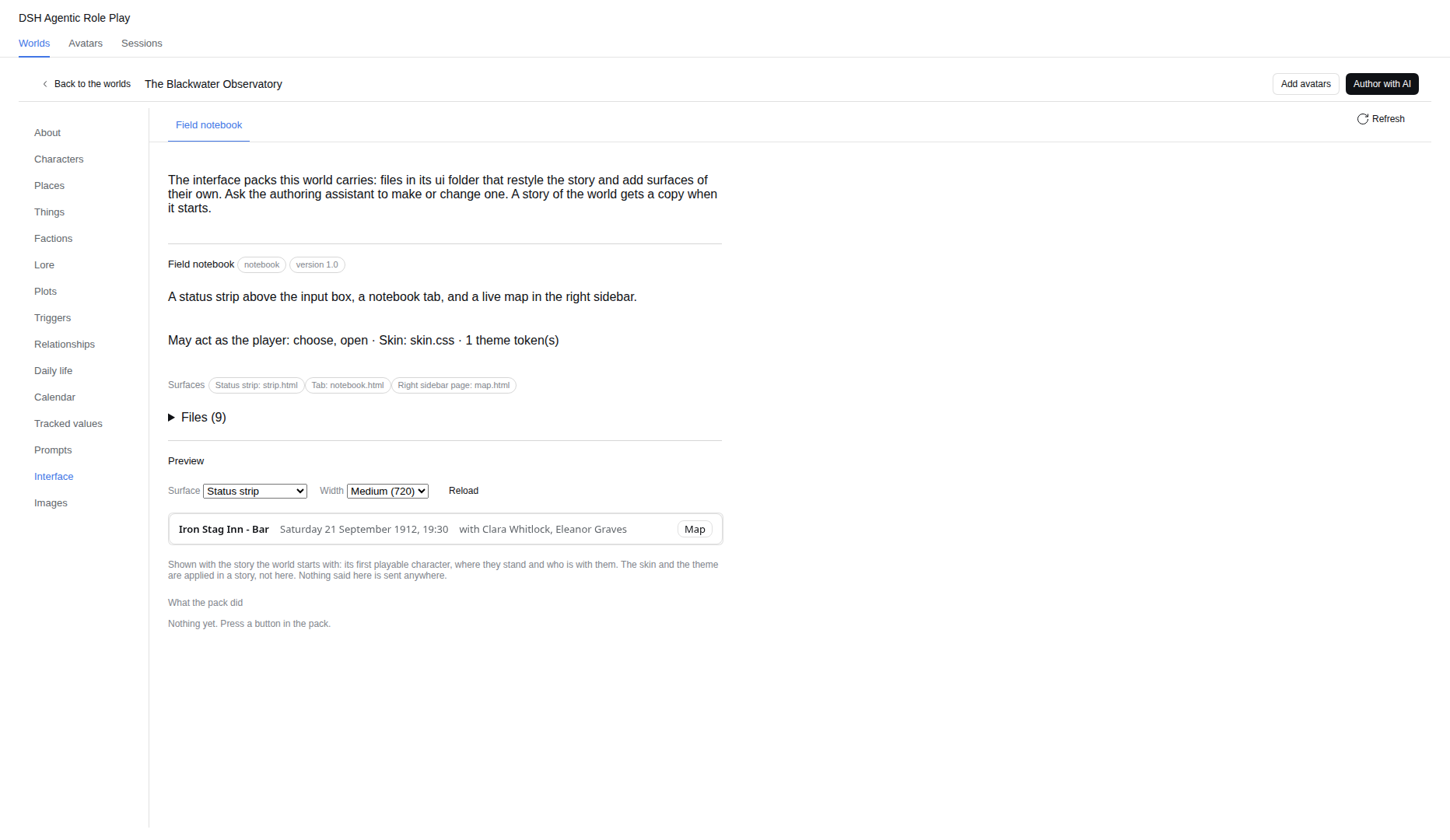
The starter world, The Blackwater Observatory, carries a pack called Field notebook. Add the world, start a story, and you get a status strip with the place, the time and who is here, and an Interface tab with the places you know, who is here, what you carry, the suggested actions, the story so far and a notes box that is kept with the story. Its files are in ui/notebook/ of the world; copy that folder as a starting point.
The Scene pack that ships with the plugin
The plugin ships a small pack, Scene, that works with any world: a status strip with the place, the time and who is here, and a live map of the places you know in the right sidebar. It is put in your roleplay folder's ui folder when DSH starts (a copy you edited is never overwritten; one you deleted comes back). To use it in a story, pick Scene in the story's Chat settings, or write scene as the Interface pack when you start it. It follows the interface language (English or Chinese), which is also what your own packs can read from rp.theme().
Look at a pack while you write it
In the world editor, the Interface section lists the packs the world carries: what each asks for and holds, every problem with the file it is in, and a preview. The preview shows one surface at a time (the status strip, the tab, the right-sidebar page and so on) in a frame, at a narrow, medium or wide width, as a story of the world would start: the first playable character, where they stand, who is with them and the places they know. Press a button in the pack and the section tells you what it asked for ("said as the player…", "asked to open the sidebar"); nothing is sent anywhere. What a pack keeps stays in memory until you reload. The skin and the theme are applied in a story, not in the preview, and the story so far is empty because no turn has been played. Edit the files, press Reload, and look again. The same section edits them: New pack makes a folder with a manifest, New file adds a text file, and Edit on a file opens it in a text box; saving checks the pack as a story start would and tells you what is still wrong.
Where packs live and which one a story uses
| Place | Used for |
|---|---|
<world>/ui/<pack>/ | A pack that ships with the world. It is checked and copied into each story when the story starts, so the story stays complete when the world changes. |
<story>/ui/<pack>/ | The copy a story plays with. Edit it to change that story only. A branch keeps the packs of the story it was cut from. |
<roleplay folder>/ui/<pack>/ | Your own packs. A story uses one only when you name it in its settings. |
By default a story uses the first pack it carries. In the story's Chat settings tab, the Interface pack section shows which pack is in use, lets you pick another from a list (including None, which shows the plain chat), and reports any problem with the file and line.
A story copies the world's packs when it starts, and later changes to the world do not reach it. When the world's packs differ from the story's copies, the same section offers Update from the world. It adds the new packs and replaces the changed ones, and the copies it replaces are kept in the story's .trash folder. Nothing is changed while any pack of the world has a problem.
Files are read again as they change, so while you work you can edit a story's copy and watch the page follow within a few seconds. A pack with a problem is withdrawn until it is fixed.
Make your own
The smallest useful pack is a manifest and one page.
pack.json
{
  "name": "Place and time",
  "api": 1,
  "surfaces": { "hud": { "file": "hud.html", "height": 40 } }
}
hud.html
<!doctype html>
<p id="line"></p>
<script>
  rp.watch((view) => {
    const place = view.place ? view.place.name : 'Nowhere'
    const time = view.time ? view.time.text : ''
    document.getElementById('line').textContent = `${place} — ${time}`
  })
</script>
Put both in <world>/ui/place-and-time/, start a story from the world, and the strip appears above the input box. rp.watch calls your function with what the player may know, now and after every change.
A few habits make a pack look right:
- Use DSH's colours. The frame gets them as CSS variables, so
color: var(--dsw-alias-label-primary)andbackground: var(--dsw-alias-bg-layer-1)follow the light and dark theme. Do not hard-code white or black. - Keep strips short. A strip asks for its height with
rp.resize(height); strips may be 24 to 320 pixels tall, the opening card 120 to 640. - List only the actions you use. Buttons that speak or fill the input need
say,fillorchoosein the manifest'sactions; anything not listed is refused. - Use relative addresses for your own stylesheet, scripts, data and images. Nothing can be loaded from the internet, so ship what you need, libraries included.
- Build with text, not markup from the story. Set
textContent, notinnerHTML, when you show names and descriptions.
Restyle the story's text
A skin changes how the story's own text looks, with no JavaScript. Name it in the manifest ("skin": "skin.css"). Each element of the story carries a data-rp attribute, and every part of a selector must name one:
[data-rp="utterance"] { border-left: 3px solid var(--dsw-alias-brand-primary); padding-left: 10px; }
[data-rp="utterance"] [data-rp="words"] { font-family: Georgia, serif; }
[data-rp="speaker"] { color: var(--dsw-alias-brand-primary); }
The elements you can style, and the rules a skin must follow, are in the reference. A skin with a mistake is refused as a whole, with the line.
Let the assistant write it
The world authoring assistant can write a pack for you. Describe what you want to see and where, for example “a strip with the time and the mood of the people here”. It reads a short guide, writes the files one at a time, and checks the pack until it reports no problems.
It uses DSH's own file tools, and in this chat they are limited to ordinary text files of the world's interface packs (<world>/ui/<pack>/: html, css, js, json, txt and svg, up to 200 KB a call). Symbolic links in the path are refused, so an approved pack path cannot redirect a tool outside the world. It cannot reach any other file of the world, and asking for wider access does not change that. Every change asks you first, and DSH shows what changes as a diff. Pictures and fonts are added by hand.
Plugins you may want (third-party)
The plugins below are made by other people. They are mentioned only because they work with the file tools the authoring assistant uses, and some users may want them. The maintainer of this plugin does not endorse them, and their authors do not endorse this plugin. Read what a plugin does before you install it, and decide for yourself; installing it is at your own risk. We tried the versions named here once, on the date given, and cannot promise they keep working with later versions of either side.
Because the assistant writes with DSH's own read, write and edit tools, plugins made for those tools can review or restrict what it does. We tried two, with DSH 0.2.0-rc.2 on 14 October 2026:
dsh-diff-approval(version 0.34.0) collects every change the assistant makes in a pending list, shows the diff, and lets you keep or revert it per block or per file. In our try, reverting put the file back as it was. Install:dsh plugin add dsh-diff-approval. It also adds a tool of its own,diff_approval_annotate, to the assistant, which lets it add notes to files in your review list; it does not write files.dsh-permissions(version 2.0.2) adds rules for tools and paths. If you keep its default of asking before everywrite, you are asked twice for each change: by it, and by this plugin. Install:dsh plugin add dsh-permissions.
Other review or permission plugins may work too; we have not tried them. One we would not use with roleplay chats is an undo plugin that snapshots the whole workspace, because for a roleplay chat the workspace is your roleplay folder with every story's database in it.
Sharing a pack
A world's packs travel with the world's folder. Anyone who gets the folder gets the packs, and each story they start copies them.
A pack is code from whoever wrote it. The sandbox keeps it out of your files, login, browser storage and DSH page, and blocks ordinary network resource loads, but the pack can show anything inside its frame and can navigate that frame to an external URL. That URL could contain story data the bridge gave it. Read and trust a pack before you use it; the sandbox is containment, not a substitute for trust. A story's Chat settings can switch packs off for that story (None).
If something does not work, see Troubleshooting.